
One quiet inbox for every account.
Kuverta is a Mac mail app for Gmail, Outlook, iCloud and AOL. All your accounts share one inbox, every action has a key, and the app talks to your provider directly. There’s no Kuverta server in between.
For Apple silicon Macs, macOS 14 or later.
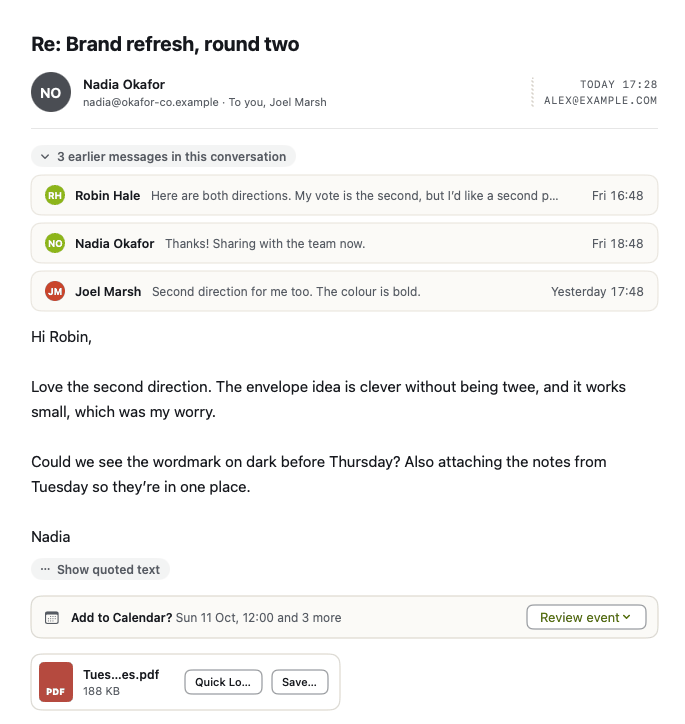
Works with Gmail, Outlook.com and Microsoft 365, iCloud Mail and AOL Mail. Add as many accounts as you like.
What it does
Not much that other mail apps don’t. It just does it with fewer steps, and leaves out the rest.
-
A command palette on ⌘K
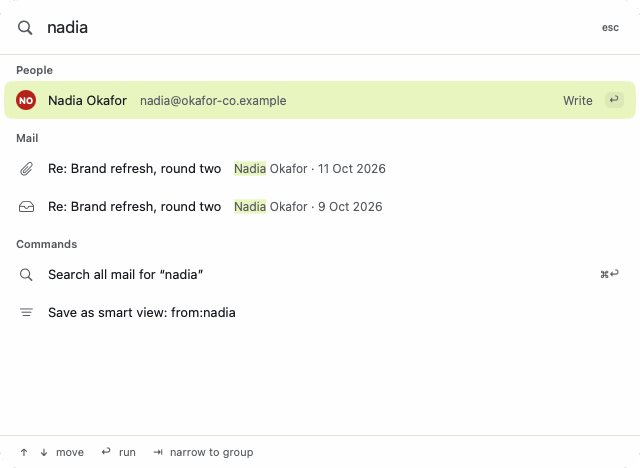
Type a name, a subject or the start of a command. People, messages and commands come back in one list, grouped, with the shortcut shown next to each command. Return runs it.
-
Gmail’s keyboard shortcuts
j and k move through the list, e archives, r replies, a replies to all, / searches and ? shows the rest. If your fingers learned different letters, change them in Settings.
-
Sign-in codes, without opening the email
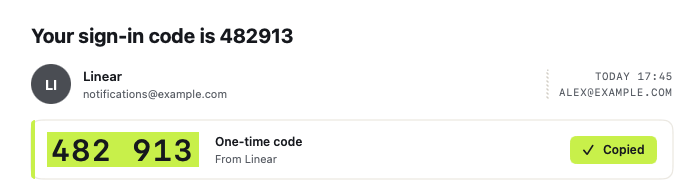
When a message carries a one-time code or a magic link, Kuverta pulls it out. Copy it from the message list, the message itself or the menu bar, or press ⌃⌥C in any app to copy the newest one. Copied codes are flagged so clipboard history apps skip them, and they’re cleared from the clipboard after 90 seconds unless you’ve copied something since.
-
A small inbox in the menu bar
The unread count, your latest code with a Copy button, and the newest unread mail. Close the main window and Kuverta keeps running up there.
-
Undo Send, ten seconds by default
Every message waits 10 seconds before it leaves; you can make that 5, 20 or 30. ⌘Z or the Undo Send button puts it back in the composer. Once delivery has started it can’t be recalled, and Kuverta tells you so rather than pretending.
-
Images off, trackers out
Remote images stay off until you load them for one message or allow a sender for good. Known tracking pixels are removed either way, and scripts in HTML mail don’t run.
-
Search that works offline
Mail is indexed on your Mac, so search is quick and still works on a train. Filters like
from:,has:attachmentandis:unreadturn into tokens as you type.
Where your mail goes
Between your Mac and your email provider, and nowhere else.
I didn’t build a server for Kuverta, so there isn’t one to keep a copy of your mail, and there’s no Kuverta account to sign up for. The app connects straight to Google, Microsoft, Apple or AOL.
App passwords, sign-in tokens and any AI keys go into a single item in your macOS Keychain, which Kuverta reads once per launch. Mail is cached in ~/Library/Application Support/Kuverta with private file permissions, which is what makes it open quickly and search offline. Remove an account in Settings and its cache and saved sign-in go with it.
There’s no analytics or crash reporting in the app. The only time it contacts kuverta.app is to look for an update, and only when you ask it to or switch automatic checks on.
If you connect Gmail with Sign in with Google, Kuverta uses that access only to show, search, send and organise your own mail in the app. Kuverta’s use and transfer of information received from Google APIs will adhere to the Google API Services User Data Policy, including the Limited Use requirements.
The privacy policy has the details, including how Gmail data is handled and what happens if you load remote images or set up an AI provider.
Price
Not set yet. It’ll be on this page before the first release.
Questions
When can I get it?
Not yet. Kuverta is in active development, and the download will be on this page when the first public release is ready.
Which Macs does it run on?
Apple silicon Macs running macOS 14 Sonoma or later.
Which email accounts work?
Gmail, Outlook.com and Hotmail, Microsoft 365, iCloud Mail and AOL Mail. They share one inbox and keep their own folders and labels.
Browser sign-in for Gmail and Outlook is coming; app passwords work today. iCloud and AOL use an app password from your Apple or AOL account. Some work accounts need an administrator to approve new apps first.
Does Kuverta use AI on my email?
Only if you ask. Nothing goes to an AI provider until you set one up and run an action. If you want summaries, reply drafts or rewrites, choose a local Ollama model on your Mac or add your own OpenAI, Claude or Gemini key. AI never sends anything for you.
How much will it cost?
That isn’t decided yet. It will be on this page before release.